AI Video Generator for Social Media
Turn your concepts into cinematic motion in seconds. Skip the expensive film crews, stock footage subscriptions, and complex rendering software. You define the scene, and Xroad Studio generates professional video clips instantly.
Start for free100 free credits · No credit card required
How the workspace operates
Generation Modes
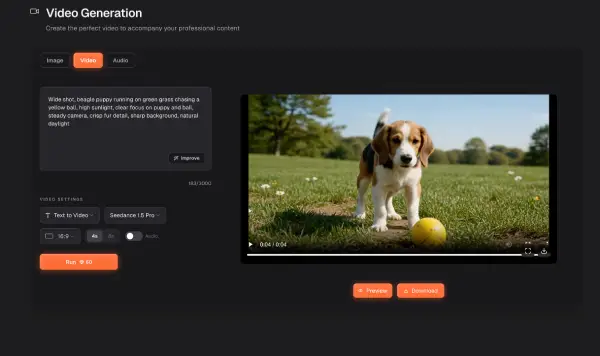
Describe a scene to generate motion from a blank canvas using text, or upload an image to animate it with full control over the result.
AI Model
Powered by Google Veo 3.1, an industry-leading foundation model, in a single unified platform.
Aspect Ratios
Generate your video for the platform it lives on. Select wide cinematic formats for YouTube or vertical frames for short form mobile content.
Best practices for AI video
Professional filmmakers do not try to generate entire movies at once. They build cinematic sequences using these core principles for short form generation.
The One Action Rule
AI models perform best with focused intent. Limit each generation to a single clear action like a character turning their head or a car driving past the camera to avoid visual morphing.
Animate Images First
The industry secret to perfect video is starting with a perfect still. Generate your scene in our Image tool first to lock in the lighting and composition, then push it to the Video workspace to add motion.
Move the Camera
If you want high energy video without visual glitches, keep your subject movement subtle and rely on camera movement. A slow zoom or a cinematic pan creates incredible depth while keeping the generation stable.
Build with B-Roll
Treat your generations as premium b roll footage. Professional creators focus on generating multiple short and highly polished clips of different angles, then stitch them together in editing to build a complete narrative.